Fiscal
VAT (303 & 390), withholdings for professionals and rent (111, 115, 190, 180), income-tax instalments (130), intra-community operations (349) and third-party operations (347) — prepared automatically from your activity.
Accounting & tax
The POS already holds your sales, your expenses and your staff. Mesero turns them into the drafts of your Spanish tax models and passes your team's hours to the gestoría for payroll — and a licensed gestoría reviews and files them with the AEAT and Social Security. You never touch a form or an Excel sheet. And because the software does the heavy lifting, the gestoría comes at a transparent price.
Not another module or a tidy spreadsheet: a licensed gestoría that handles your tax, payroll and accounting. The difference is that it works on data Mesero already has — your sales, expenses and team — so it prepares the models in minutes instead of weeks, and you follow it from the panel.
VAT (303 & 390), withholdings for professionals and rent (111, 115, 190, 180), income-tax instalments (130), intra-community operations (349) and third-party operations (347) — prepared automatically from your activity.
Hires and terminations in Social Security, monthly payroll, contracts and Sistema RED filings. You flag a change; the gestoría processes it.
Income and expense ledgers kept current, with the sales taken from the POS itself. Quarterly closes and annual summaries that match what was filed — no surprises at year-end.
The workflow stays the same, minus the mid-month manual work. The data is already inside; it just needs classifying and reviewing.
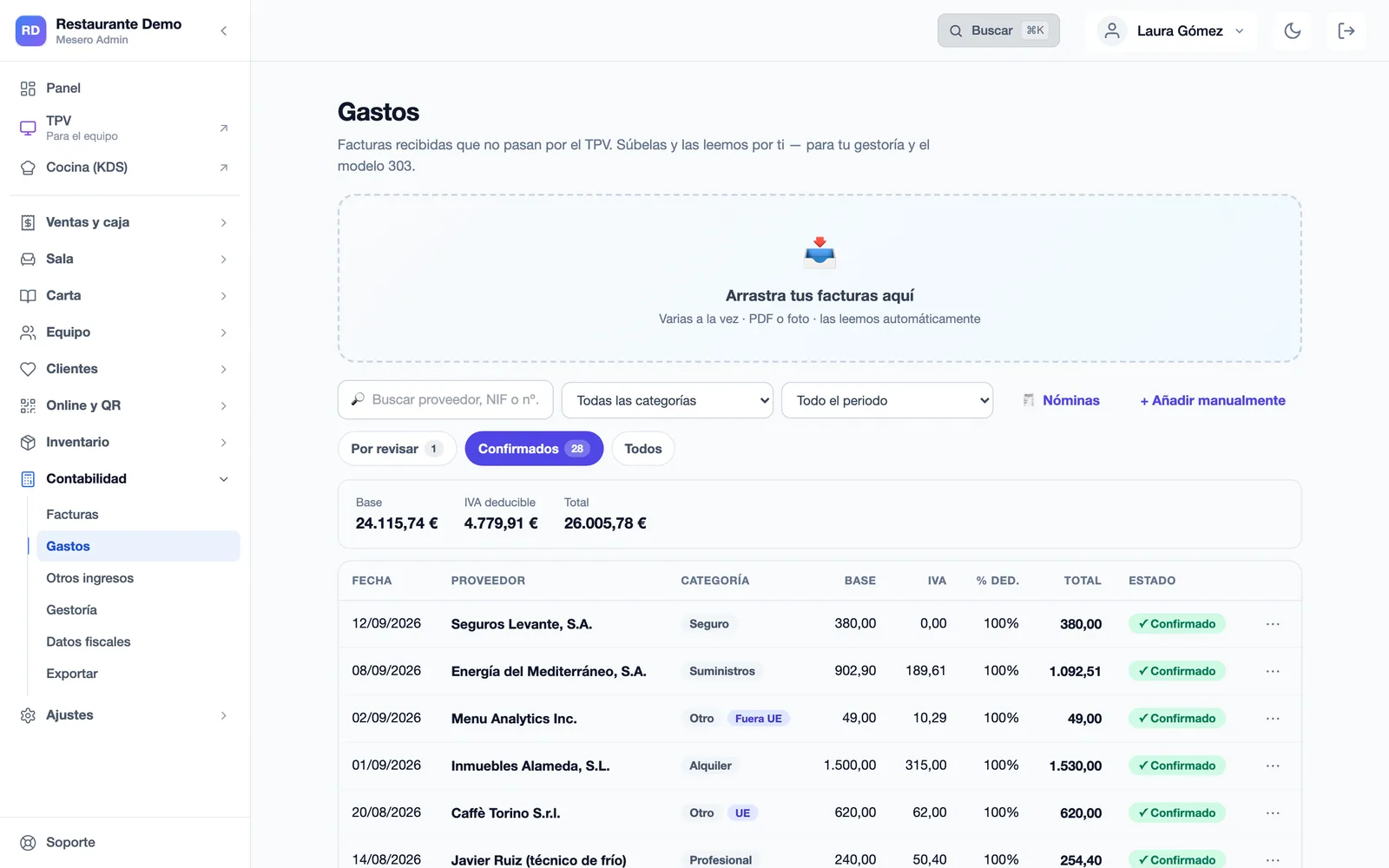
A photo or a PDF of the invoice is enough: Mesero reads the supplier, the tax ID, the base, the VAT, the withholding and the zone, and leaves it ready for you to confirm. What you confirm goes into your drafts.
Ready to review: confirm it and it goes into your drafts
Each draft is built from your real data and left ready for the gestoría to review and file. Mesero never submits anything to the tax office on its own: it prepares, the gestoría files.
Payroll & Social SecurityThe gestoría runs payroll with the hours Mesero passes it, and handles hires, terminations and changes in Sistema RED.
Ledgers & closesIncome and expense books kept current, with the sales from the POS itself, ready for your annual return.
The general filing deadlines, with the next one marked. In Mesero's panel you always see the next deadline; your gestoría takes care of filing.
General AEAT deadlines. If the last day falls on a Saturday, Sunday or public holiday, it moves to the next working day. The 130 is for the self-employed on direct estimation; the 349 only if you trade with the EU.
For the gestoría to file on your behalf, you authorise it. Mesero makes it easy with a two-step wizard — no paperwork, no trips.
You sign the social-collaboration mandate on screen (art. 92 of the General Tax Law). It authorises the gestoría to file your returns electronically. You download the signed document and can revoke it any time.
The gestoría requests to manage your Contribution Account Code and you simply confirm it in the e-office with your certificate or Cl@ve. From then on it can handle hires and terminations for you.
The gestoría charges transparent professional fees. Because Mesero automates the preparation, you don't pay the overhead of a traditional gestoría's manual work. These are the gestoría-service prices; your POS plan is billed separately.
Advisory and management across tax, payroll and accounting: filing your models, books kept current and your questions answered.
Monthly payroll for the team. The per-employee price depends on the collective agreement and complexity. You only pay for the staff you have.
Each hire, termination or change in Social Security. Only when there's a movement — no fixed per-employee fee.
Full management (€85), plus each payslip at €15–30 depending on the agreement, plus €20 per movement. With the fees on this page; your POS plan is billed separately.
Already have a gestoría and just want the automation? You can also use Mesero to prepare the drafts and hand them to your own advisor. Tell us your case.
A traditional gestoría spends hours gathering your data, keying invoices and reconciling books. With Mesero that work is already done, so the gestoría focuses on what adds value — reviewing, advising and filing — and the price reflects it.
Sales come from the POS and invoices are read by AI. Nobody spends days asking you for paperwork each quarter.
Priced by item: management, payroll and movements. You know what you pay before the invoice arrives.
You see each model's drafts and the next deadline in your panel, and when your gestoría files the 303, it marks it as filed. The gestoría isn't a black box.
The questions tend to be the same: whether you can keep your own advisor, what you sign, how EU and foreign operations are handled, and who actually files.
Two paths, both work:
Either way, the filing with the tax office is always done by a gestoría: Mesero prepares, never submits on its own.
A social-collaboration authorisation for the tax office (signed on screen, art. 92 LGT) and the confirmation of your Contribution Account Code assignment in Social Security's Sistema RED. Both are done online, guided from the panel, with no trips, and you can revoke them any time.
Sales flow automatically from your POS (VeriFactu tickets) and off-POS income (Glovo, Uber Eats, catering). You upload expenses as a photo or PDF and we read them with AI: supplier, tax ID, base, VAT, withholding and zone. You just review.
Yes. Mesero distinguishes Spain, the EU and outside the EU, and applies the right treatment: reverse charge on intra-community acquisitions, services from outside the EU (software, advertising), goods imports and exempt exports. It's exactly where a traditional gestoría loses the most time.
The gestoría, on your behalf, with the authorisation you signed. Mesero prepares the drafts and shows you the deadlines, but filing with the AEAT and Social Security is always done by a licensed professional. Every draft is marked as one your gestoría reviews and files.
Yes. You set your regime (self-employed on direct estimation, módulos, or company) and Mesero takes it into account: for example, the Model 130 draft only appears if you are self-employed on direct estimation. The gestoría handles Corporate Income Tax if you're an SL.
No, they complement each other. VeriFactu is the verifiable invoicing of your tickets (included on every plan); the gestoría uses that sales data to prepare your taxes. One invoices to the letter of the law, the other settles your models.
Tell us how many you are and how you're taxed, and we'll tell you exactly what you'd pay and what you'd sign. No commitment, clear numbers from minute one.